DevOps Multi Cloud with AI & Automation Course
BECOME AI POWERED DEVOPS ENGINEER: Transition from developer to DevOps engineer by mastering AI, CI/CD pipelines, automation, and production-grade workflows.
ACCELERATE YOUR DEVOPS CAREER: Build real-world DevOps skills using AWS DevOps, Azure DevOps, Jenkins, Docker, and Kubernetes.
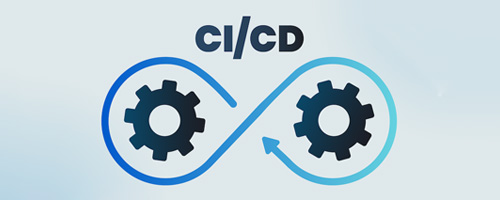
MASTER CI/CD PIPELINES: Design end-to-end CI/CD pipelines using Azure DevOps CI/CD, Jenkins, and AWS DevOps best practices.
Course Duration
4 Months
Training Options
Onsite / Online
Rating

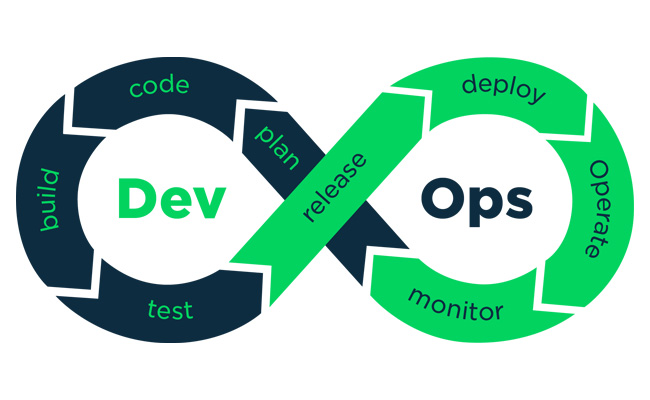
Why Should You Take DevOps Multi Cloud with AI & Automation Course?
DevOps & Multi-Cloud with MLOps is in demand.
DevOps Engineering is rated as one of the happiest professions.
DevOps has a great career path.
Can't find a batch you were looking for?
About Course
- BECOME AI POWERED DEVOPS ENGINEER: Transition from developer to DevOps engineer by mastering AI, CI/CD pipelines, automation, and production-grade workflows.
- ACCELERATE YOUR DEVOPS CAREER: Build real-world DevOps skills using AWS DevOps, Azure DevOps, Jenkins, Docker, and Kubernetes.
- MASTER CI/CD PIPELINES: Design end-to-end CI/CD pipelines using Azure DevOps CI/CD, Jenkins, and AWS DevOps best practices.
- DEPLOY WITH CONFIDENCE: Replace manual deployments with automated DevOps pipelines trusted in real production environments.
- BUILD REAL DEVOPS PROJECTS: Implement hands-on DevOps projects using Docker, Kubernetes, AWS, and Azure DevOps pipelines.
- SHIP CODE WITHOUT FEAR: Use CI/CD automation to deploy applications safely without relying on manual commands or memory.
- ELIMINATE HUMAN ERRORS: Prevent failed builds and broken deployments using automated testing, Docker image versioning, and pipelines.
- BUILD ONCE, RUN ANYWHERE: Create consistent Docker and Kubernetes deployments that work across local, staging, and production.
- ENABLE FAST FEEDBACK LOOPS: Catch bugs early using CI/CD pipelines, Jenkins
- ADOPT A PRODUCTION DEVOPS MINDSET: Think like a DevOps engineer by trusting automation over humans for scalable systems.
Skills Covered


Career Services At SKILLNXT
Get ready for your dream job! Attend comprehensive industry readiness training with Career Services.
Communication Skills
Interview Preparation Workshop
1:1 Career Mentoring
Project Preparation
Profile Enhancement
Resume Building
Mock Interviews
Placement Support
Online & Offline Batch Flexiblity
Get live training and interaction with trainers through online and offline batch flexibility
Industry-Relevant & Updated Syllabus
Learn the industry's latest tools, techniques & trends.
360 Degree Knowledge Building
Develop practical skills through real-world projects & assignments
1:1 Dedicated Mentorship
Personalized learning experience from experienced industry professionals.
FAQ's
Our DevOps Training in Hyderabad is of 4 months duration.
Daily 1.5 hour theory + 1.5 hour practical session.
Monday to Saturday Sessions.
The DevOps project work in this course entails several key components. Firstly, students will be tasked with setting up a comprehensive LAMP (Linux, Apache, MySQL, PHP) environment. This involves installing and configuring each component to ensure seamless integration and optimal performance.
Additionally, the project work requires students to meticulously configure the web, database, and application layers within the LAMP environment. This step involves fine-tuning various settings and aligning them with specific project requirements to guarantee smooth functionality and efficient data processing.
Furthermore, the implementation of system monitoring tools is an important aspect of the project work. Students will learn how to select and deploy appropriate monitoring solutions to ensure the continuous tracking and analysis of the LAMP environment's performance. This enables prompt identification and resolution of any issues that may arise during system operation.
Overall, this project work provides students with the opportunity to apply their knowledge of DevOps concepts and tools in a practical setting. By undertaking this real-world scenario, students can gain valuable hands-on experience in the various stages of DevOps project development.
In DevOps, build automation is implemented through the use of Maven. Maven is a powerful tool that is specifically designed for build automation purposes. It provides a structured approach to managing and organizing projects, making it an ideal choice for DevOps teams.
To implement build automation using Maven, participants in the DevOps training are introduced to its core concepts and functionality. They learn about the structure and phases of Maven, gaining an understanding of how Maven manages the build process. This includes learning about the various lifecycle phases that Maven supports, such as compilation, testing, packaging, and deployment.
Installing Maven is an essential step in the build automation process. The training covers the detailed steps needed to install Maven on different operating systems, ensuring that participants have the tools necessary for successful build automation.
Configuration is another important aspect of implementing build automation with Maven. Participants learn how to configure Maven to suit their specific project requirements. This includes setting up dependencies, repositories, and plugins, among other configurations.
In addition to understanding Maven's structure and configuration, participants also learn about the commonly used jar/war project structure in build automation. This structure provides guidelines on organizing the source code and resources within a project, enabling efficient build automation and deployment.
By mastering Maven and its associated concepts, participants in the DevOps training gain the knowledge and skills needed to effectively implement build automation. This prepares them to streamline the build process, improving the efficiency and reliability of software development within the DevOps environment.
In DevOps, environments refer to distinct spaces or configurations where applications and software are developed, tested, and deployed. These environments serve different purposes throughout the software development lifecycle. Four common types of environments in DevOps are:
1. Development Environment: This environment is used by developers to write, modify, and test code. It provides a space for programmers to work on individual components of a software application without affecting the main production environment. Developers can experiment, collaborate, and ensure that the code functions as intended in this controlled environment.
2. Testing Environment: Once the development phase is complete, the software moves to the testing environment. Here, Quality Assurance (QA) engineers thoroughly test the application for bugs, errors, and potential issues. Various types of testing, such as unit testing, integration testing, and performance testing, are conducted in this environment to ensure the application meets the desired quality standards.
3. Staging Environment: After successful testing, the software is deployed to the staging environment. This environment closely resembles the production environment and serves as a final checkpoint before the software is released to end-users. The staging environment allows for additional testing and validation, enabling teams to verify the application's performance and functionality in an environment that closely mirrors the production setup.
4. Production Environment: The production environment is the live or operational environment where the software is made available to end-users. It is a fully functioning system that reflects the actual user experience. The production environment is carefully configured to optimize reliability, security, and performance. Continuous monitoring and maintenance are crucial in this environment to promptly respond to any issues that may arise.
By utilizing different environments, DevOps teams can ensure a systematic and thorough approach to software development, from initial development to final deployment. This segregation of environments allows teams to maintain control, conduct comprehensive testing, minimize risks, and deliver high-quality software to end-users.
Yes, you are going to work on real-time projects during learning to gain real-time projects experience.
The revision control system used in DevOps is Git. Git is a powerful tool that allows for effective management of code and version control. It supports features such as local and remote repositories, branching, merging, cloning, fetching, pulling, and the installation of Git Server. With Git, developers can collaborate seamlessly, track changes, and safely manage multiple versions of their codebase. Its popularity and flexibility make it the preferred revision control system in the world of DevOps.
The course covers a range of automation concepts that are essential for streamlining and optimizing various processes. These concepts include:
1. Operating System Basics: Understanding the fundamentals of operating systems is crucial for automation. Students will learn about different operating system components and their roles in automating tasks.
2. Scripting Introduction: This module introduces students to the basics of scripting languages. They will learn about the syntax, variables, data types, and control structures required to write efficient scripts.
3. Shell Scripting: Shell scripting is a key aspect of automation. Students will gain a comprehensive understanding of shell scripting languages, such as Bash, and learn how to automate repetitive tasks by writing scripts.
4. Database Concepts: Automation often involves working with databases. This section covers fundamental database concepts, including data manipulation, querying, and scripting to automate database-related tasks.
5. Shell Variables, Decision Making, and Shell Test Conditions: Automating tasks requires the ability to handle variables, make decisions based on conditions, and test different scenarios. Students will learn how to utilize shell variables, implement decision-making logic, and perform effective shell test conditions.
6. Shell Loops, Redirection, and Exit Status: Loops are essential in automation to execute repetitive tasks. This module provides a deep understanding of different loop structures available in shell scripting. Additionally, students will master the redirection of input and output streams to automate data processing. Understanding and interpreting exit status codes will also be covered.
By completing this course, students will gain a strong foundation in automation concepts, enabling them to automate various tasks efficiently and effectively.
Installing WordPress with LAMP in a DevOps environment involves several steps.
First, an introduction to Vagrant is necessary. Vagrant is a tool used to create and manage development environments. It allows for easy configuration and reproducibility of virtual machines. Understanding Vagrant terminologies, such as boxes and provisioners, is essential.
Next, the installation of Vagrant is required. This can be done by downloading and installing the Vagrant software from the official website. Once installed, Vagrant can be used to manage the virtual machine on which WordPress will be hosted.
To enable WordPress installation with LAMP, the LAMP stack needs to be set up. LAMP stands for Linux, Apache, MySQL, and PHP. Linux is the operating system, Apache is the web server, MySQL is the database, and PHP is the programming language used for WordPress.
Once the LAMP stack is installed on the virtual machine, we can proceed with the installation of WordPress. WordPress is a widely used content management system (CMS) for building websites and blogs. It requires a PHP-compatible web server and a MySQL database. By utilizing the LAMP stack, all the necessary components are in place.
Additionally, Docker is another tool that can be utilized in DevOps for managing and deploying applications. With Docker, it is possible to create lightweight containers that encapsulate the application and its dependencies. Understanding Docker terminologies, such as images and containers, is important.
After Docker is installed, Docker images can be created for WordPress. These images contain all the necessary components and configurations to run a WordPress instance. Docker brings the advantage of portability and scalability, making it easier to manage WordPress installations across different environments.
In summary, installing WordPress with LAMP in a DevOps environment involves the utilization of tools like Vagrant and Docker. Vagrant helps set up and manage the virtual machine, while Docker enables the creation and deployment of lightweight containers for WordPress. With this approach, developers can easily manage and scale their WordPress installations in a reliable and reproducible manner.
After completion of training, you will receive a certificate of completion, which you can share with your friends, relatives, co-workers and potential employers.
Yes, you'll be able to access your enrolled course materials through our Learning Management System. Practical Assignments, Day-to-Day Class videos and readings you can access through our LMS.
Be Future Ready. Enroll Now
Structure your learning and get a certificate to prove it.
